
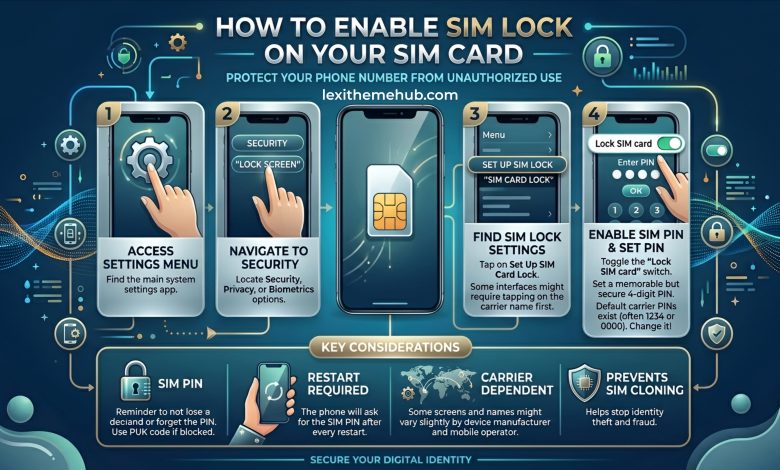
In today’s digital world, protecting your mobile number is just as important as securing your bank account. With increasing risks like SIM swap fraud, unauthorized access, and identity theft, enabling a SIM lock (also known as a SIM PIN) is a must for every smartphone user.
This guide explains everything you need to know about how to enable SIM lock on your SIM card, why it matters, and how it helps keep your personal data safe. A SIM lock is a built-in security feature that requires a PIN before your SIM card can be used. Once activated, your phone will request the PIN whenever it is turned on or when the SIM is inserted into another device.Key Benefits of SIM Lock
- Prevents unauthorized access to your SIM card
How to Enable SIM Lock on Android Devices
Follow these simple steps to activate SIM lock on most Android smartphones: 1. Open the Settings app. 2. Tap on Security or Biometrics and Security. 3. Select Other Security Settings. 4. Tap on Set up SIM card lock. 5. Toggle Lock SIM card to ON. 6. Enter your default SIM PIN (commonly 0000 or 1234). 7. Confirm your selection. Once enabled, your SIM card is now protected with a PIN code.How to Enable SIM Lock on iPhone
For iPhone users, enabling SIM lock is just as easy: 1. Open Settings. 2. Tap Cellular. 3. Select SIM PIN. 4. Turn on SIM PIN. 5. Enter your default PIN and confirm. Your SIM card will now require a PIN every time your device restarts.How to Change Your SIM PIN
For better security, it’s highly recommended to change your default PIN:- Go to SIM card lock settings
- Select Change SIM PIN
- Enter the current PIN, then set a new one
- Confirm the new PIN
Important Tips to Keep Your SIM Card Secure
- Never share your SIM PIN with anyone
- Avoid using simple PINs like 1234 or 0000
- Enable screen lock (password, fingerprint, or Face ID)
- Contact your network provider if your SIM is lost or stolen
- Be careful when entering your PIN multiple times to avoid SIM lockout
What Happens If You Enter the Wrong SIM PIN?
If you enter the wrong PIN multiple times, your SIM card may get blocked. You will then need a PUK (Personal Unblocking Key) from your network provider to unlock it. Always keep your PIN safe to avoid this situation. Enabling a SIM lock is a simple yet powerful step toward protecting your mobile identity. Whether you use Android or iPhone, activating this feature ensures your SIM card remains secure even if your device is lost or stolen. For anyone serious about mobile security, learning how to enable SIM lock on a SIM card is essential. Take a few minutes today to activate this feature and enjoy peace of mind knowing your personal information is protected. Stay up to date with helpful and reliable technology content by following Lexithemehub Media. By following Lexithemehub Media on X @lexithub you can access curated posts and community discussions.




Useful tips.