 By Lexithemehub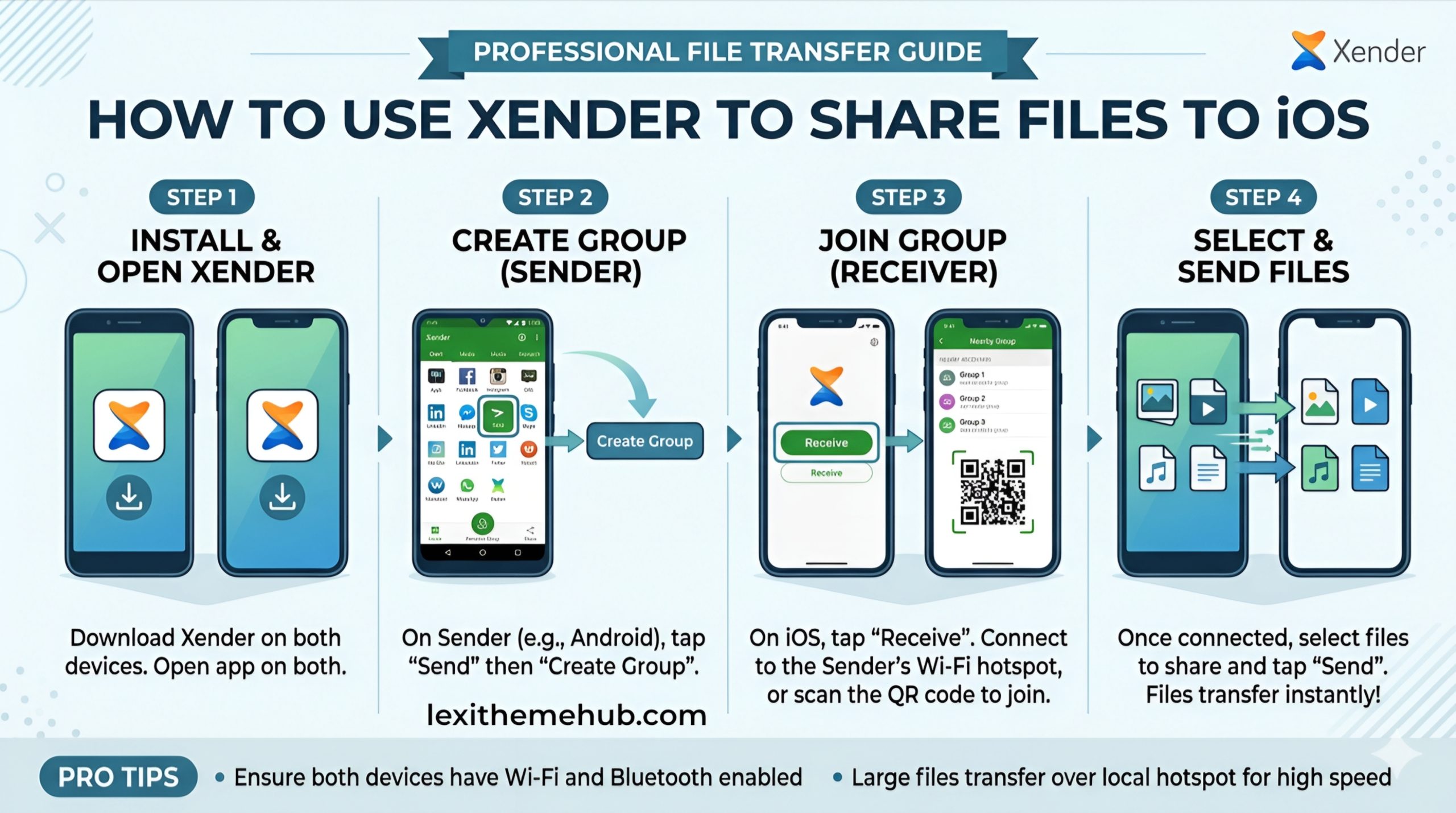
Transferring files between Android and iPhone can be frustrating especially when compatibility issues slow you down. Fortunately, Xender offers a powerful, wireless solution that lets you share files quickly without mobile data or cables.
In this guide, you’ll learn how to use Xender to send files to iPhone, along with practical tips to ensure smooth performance.
Xender is a popular file sharing app that uses Wi-Fi technology to transfer files at lightning-fast speeds. Unlike Bluetooth or cloud-based methods, Xender allows offline file transfer, making it ideal for users who want speed, privacy, and zero data cost.
How to Share Files from Android to iPhone Using Xender
1. Download and Install the App
Install Xender from the Google Play Store on your Android device and from the Apple App Store on your iPhone. Ensure both devices have the latest version installed for optimal performance.
2. Launch and Set Up Connection
- Open Xender on both devices
- Tap “Send” on Android
- Tap “Receive” on iPhone
- Select “Connect to iPhone” on Android
- A hotspot network will be created automatically
On your iPhone, go to Wi-Fi settings and connect to the hotspot shown in the Xender app.
3. Select Files to Transfer
Browse through your files on Android and select what you want to send—photos, videos, apps, or documents. Xender supports multiple file formats, so you’re not limited.
4. Start File Transfer
Tap the Send button, and your files will begin transferring instantly. The process is fast, even for large files like HD videos.
Important Tips for Smooth File Transfer
To avoid interruptions and ensure a seamless experience:
- Keep both devices close together
- Turn off mobile data during transfer
- Do not switch apps while transferring files
- Ensure both devices have enough battery power
Xender is generally safe for offline file transfers. However, for better privacy:
- Avoid sharing sensitive files over public connections
- Keep the app updated
- Download only from official app stores
Many file transfer apps struggle with cross-platform compatibility, but Xender is designed to work smoothly between Android and iOS devices. Its user-friendly interface and high-speed technology make it one of the best tools for everyday file sharing.
If you’re searching for a reliable, fast, and free way to share files from Android to iPhone, Xender is an excellent choice. With no cables, no internet, and no stress, you can transfer files in seconds.
Stay up to date with helpful and reliable technology content by following Lexithemehub Media. By following Lexithemehub Media on X @lexithub you can access curated posts and community discussions.

Xender is the best app to share files.
Enjoy every single day
Every day is a new beginning